Looking for a Language [Guest Diary]
by Jeffray Spence, SANS.edu BACS Student (Version: 1)
[This is a Guest Diary by Jeffray Spence, an ISC intern as part of the SANS.edu BACS program]
Around Here, we start our day with coffee, but our day does not begin until we have our data...So much data. Where to even begin?
When approaching a massive dataset, such as those from a DShield SIEM Honeypot, the first step is to actually find something to analyze. As for myself, I usually go looking for something that makes me go; "Huh."
Today we will be walking through a starting approach with Kibana Discover to search out embedded language preferences in webtraffic, then we will use this as a starting point for finding anomalous activity.
Find A Problem to Get Some Data
Inside of my DShield SIEM there are nearly a million records, so I approach by looking for a slightly smaller data carve with which to work which still represents the problem set:
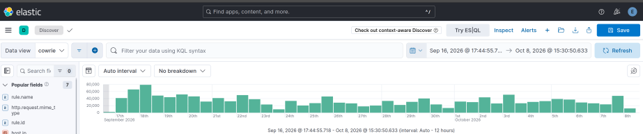
Anyone with Elastic Kibana can perform this approach on their webtraffic data as long as the HTTP headers are provided. Here, the logs are from my SANS Dshield Honeypot and the accompanying Dshield SIEM. For those who desire to install this setup there are plenty of great resources out there with links at the end of this article [1] [2].
In slightly more than 3 weeks of observation the rasperry pi honeypot had transferred a Million Records into the Elastic SIEM. These many records can prove very challenging when figuring out where to start, so it is helpful to know that even with no filtering applied on the Discover page the Field Statistics will give some fairly detailed metrics about what fields exist in the current Index.
On the Discover page in the upper right, I selected my index (here the index is “cowrie”) and without any filter applied I selected Field Statistics:
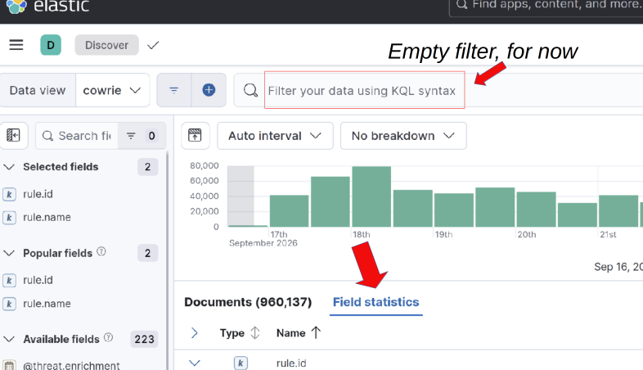
Calculating statistics ourselves is possible using ESQL and Stats, however this feature of Elastic makes gaining visibility much more obtainable at the onset. We are immediately presented with a screen displaying all of the Documents broken down by Top Values which potentially gives us some valuable insight:
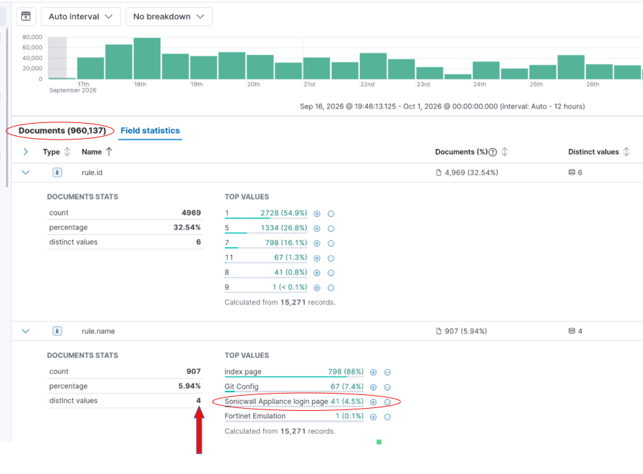
The resultant statistics show that in these 3 weeks my honeypot had generated 960,000 logs, but all of those are only within 4 rules. Four is less than a 960,000 so this gives a more manageable starting dataset:
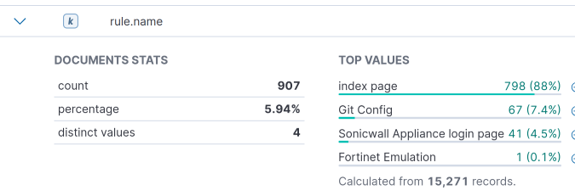
“Huh.” This little raspberry PI has been humming away quietly all day and all night and only 4 rules have popped up. I found this interesting. With no filtering applied only 15,271 records triggered any rule?
This setup is a honeypot, so literally every record is suspicious. So, what about the other 944,866 records which triggered no rules?
Today, we want a problem not a project, so we are going to use one of these rules to narrow down our traffic for analysis.
We have rule triggers for the Index page. Boring. Great for generating a large dataset, but this is not a very targeted approach.
Git Config is something I had previously analyzed, and this led me to discover malicious traffic attempting to scrape Git Config from internet hosts. Neat, but not for today.
Fortinet Emulation, for those who don't know, has fairly recently gotten a lot of attention [3].
Only one detection so far in my honeypot, so for me that's just an outlier. Interesting, but not much of a corpus.
Through the process of elimination, we are left with the Sonicwall Appliance Login Page rule.
Good representation over the problem space with 41 individual hosts logging in activity. This could potentially demonstrate how an attack is conducted or give a clue as to who was conducting one. Perfect because we are looking for regular and repeating attack attempts. I selected these criteria as a Kibana filter.
Now to start digging.
Data Selection
Now that we have a smaller dataset to work within, we need to decide what we want to find. After that we need to figure out how to actually find that.
This first approach is what I would NOT recommend One do:
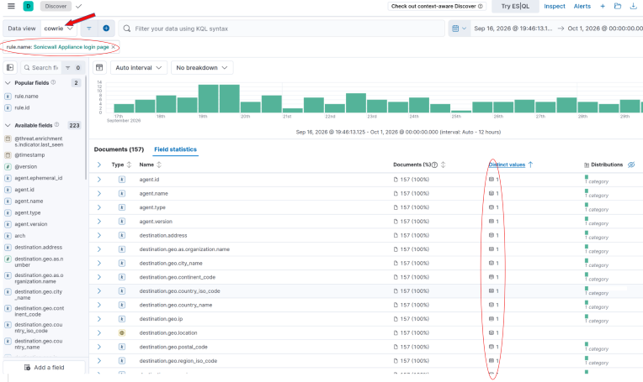
Noticing here that every field statistic for all 157 records has One Distinct Value and only1 category under Distribution tells us these fields are ALL common to ALL records. A field common to every record will have a unique value for each record.
We don't want common, we want weird: the approach I will use is to flip it and look at Distribution 2 or higher. This is Long tail analysis:
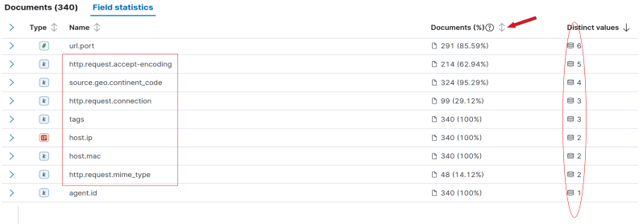
Here we see the Distinct values are now descending with the “sweet spot” between 2 and 6 so. Not an exact criterion, but one that is practical for manual review.
Within these fields we have fields of interest:
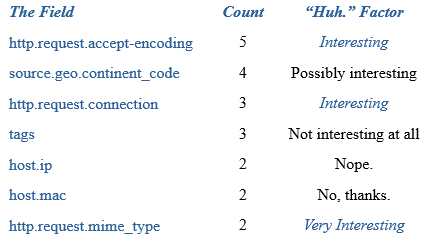
When fields contain similar values, they may illustrate a relationship between the data represented. Here the traffic triggering the Sonicwall Rule contains a relatively small subset of unique values. The next step is to find something we cannot readily explain away; a simple exercise to conduct on the “tags”, “host.ip”, and “host.mac” fields. The IP and MAC are going to be both interfaces of my Dshield Pi itself, while the Tags are going to be metadata about how the rules generate. The “source.geo.continent_code” is not very useful in a Virtual Private Server (VPS) enabled world but may prove useful later. This leaves 2 fields:
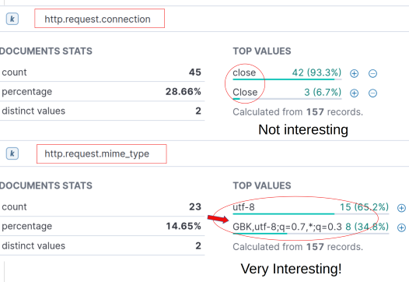
http.request.connection
"Close" and "close". Most traffic parsing tools are going to convert these all to lowercase string, and thus never see this small difference.
. No longer interesting.
http.request.mime_type
"utf-8" (the defacto choice) verses some interesting mime encoding...
Next was to break down what this mime encoding is saying: "GBK,utf-8;q=0.7,*;q=0.3"
This string is sent to a webserver as the Accept-Charset HTTP header. Values of GBK,utf-8, and wildcard (*) are present. The preference weights are specified as "q" (for “quality value” by convention). Since the implicit maximum weight value is q=1.0, the simplified character set preferences are:
(GBK;q=1.0),(utf-8;q=0.7),(*;q=0.3)
I think of this as a preference for what character encoding to use:
(Send me “GBK” 100% of the time, if not “utf-8” 70%, and if not Whatever 30%)
UTF-8 makes sense as does wildcard (*). However, GBK is explicitly the extension of the “GB 2312” character set for Simplified Chinese characters.
"Huh."
Why do these requests explicitly state they greatly desire to transfer data to my Honeypot, which is not in China, using an exclusively Chinese character set?
I also apply this as a filter in Kibana to narrow our results to 8 Records:

Two issues are now present. This dataset of 8 records is too narrow to work with, and also, we don’t actually care about the Sonicwall rule anymore now that we find some interesting traffic. Next, we need to pull in some additional data for this mime type field.
Finding commonality
So my Elastic SIEM, the webhoneypot index is for Webserver Logs, and my cowrie index shares these fields. Here the filter works for both.
At this point we are not interested in the “Sonicwall Appliance” filter anymore, so we remove it. We are now using the “Mime Type” field to work out the language preferences and have 47 interesting records within the http.request.mime_type:
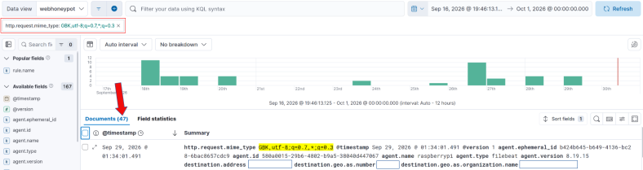
These records now represent every inbound connection attempt sending this exact same format string for the GBK Character set preferences. There are 47 requests in total which send the identical preference header. How can we use this header to find odd traffic in our data?
The problem set has not changed, only our dataset. We repeat the same process of sorting the Distribution Field under the Field statistics section.
Following this Distribution Analysis process we see two User-Agents, which is interesting.
However, we also very clearly see there are two source.geo.region_name values:
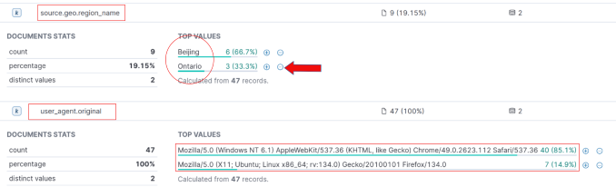
“Beijing”, yeah, ok that makes sense. Beijing is in China… but “Ontario”?
"Huh". People do move around, however, following a purely statistical analysis approach one would not anticipate that Canadian Cyber actors would greatly desire a Chinese Character set while targeting my American Honeypot. This presents as an anomaly.
We add the source.geo.region_name: Ontario filter and observe there are now only 3 records:
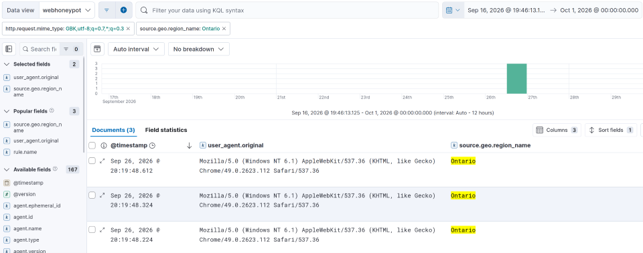
At this point I exported these three records to Libre Office so I could look at them:

Modern VPS availability makes the Autonomous System (AS) number far more useful than an IP: AS-7456 is the system responsible for all three of these records.
This field, “source.geo.as.number” will be our next field to analyze:

What’s Your Number?
We now set our new filter to be source.geo.as.number: 7456
We remove all other filters and follow the same “Distribution Analysis” as before. We immediately find the same pattern:
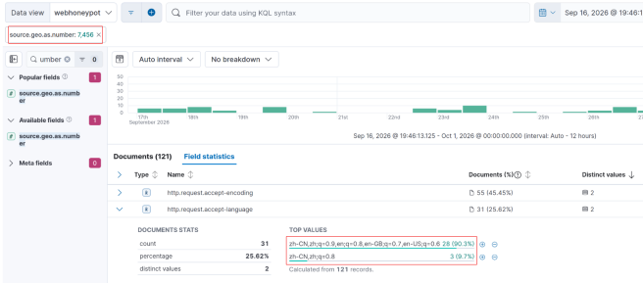
There is again a language preference but this time in a different field:
The http.request.accept-language encoding for all 31 requests from AS-7456 read as either:
zh-CN,zh;q=0.9,en;q=0.8,en-GB;q=0.7,en-US;q=0.628 at (90.3%)
OR
zh-CN,zh;q=0.83 at (9.7%)
"zh-CN" means "Mainland Chinese" Language preference.
"zh" just means any version of Chinese.
For all 121 records observed for this AS there were 31 alternative language preference specified.
This is an optional header, however the indication of a desired alternate language preference can narrow down our search scope considerably.
I applied the filter as:
http.request.accept-language: "zh-CN,zh;q=0.9,en;q=0.8,en-GB;q=0.7,en-US;q=0.6" OR http.request.accept-language: "zh-CN,zh;q=0.8"
At this point I exported the 31 records for this filter:
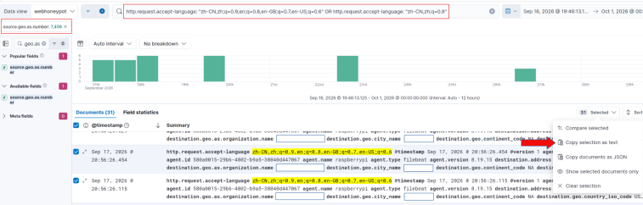
I took these records over to LibreOffice as a Tab Separated Value sheet so I could have a look at it.
When I did the pattern was unmistakable:
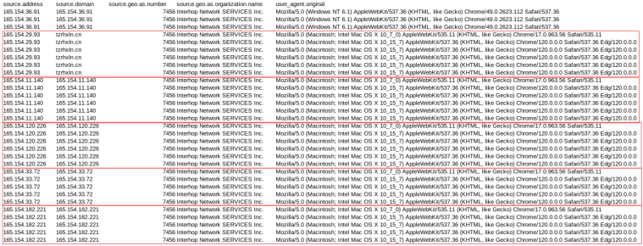
These are all regularly scanning internet hosts for the same set of endpoints all from the same Canadian based AS-7456:
165[.]154.36.91
165[.]154.29.93
165[.]154.11.140
165[.]154.120.226
165[.]154.33.72
165[.]154.182.221
Values for http.request.body.content were all consistent repetitions of:
/cgi-bin/login
/config.json
/sitemap.xml
/robots.txt
/favicon.ico
/
There is no attempt being made to conceal the fact that these user agents strongly desire Chinese character sets in the HTTP Language preferences while actively targeting internet facing endpoints. We have discovered an obviously automated campaign.
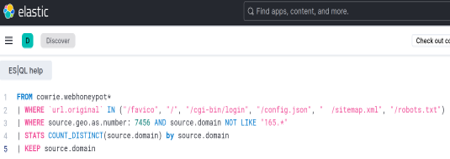
Interestingly, tzrhxln[.]cn (165[.]154.29.93) is a suspect high entropy domain.
Similar domains also appear in this dataset as extracted with this ESQL Query:
source.domain values:
leheedu[.]cn
mail.,brossy.com[.]cn
mail.brossy.com[.]cn
tzrhxln[.]cn
All of these domains operate from AS-7456, have strong CN presence, and are actively scanning.
One Conclusion
This demonstration of a simple approach to Elastic Discovery using optional HTTP language preferences and mime types is only an example. We have found high entropy domains, bot scanners, and plenty of nefarious intent, however the most interesting aspect in my view is the approach we have taken. Expanding upon this could yield automation.
Typically, when analyzing datasets in a SIEM it is common to look for all the fields that match a correlation. In this approach we attempt to match the least commonality required to gain a single insight into what hosts may be related and then repeat the data acquisition process with this selected feature. This is featuring selection, and because we are purposely iterating upon the selection with intent, we are functionally engaged in rudimentary feature engineering.
Using the embedded language preferences in webtraffic as a starting point we were able to trim a massive corpus into a manageable selection. We have also built upon some understanding of how these language headers appear in logs when browsing, so we could always simply begin selecting those features as a starting point in the future when processing SIEM data.
Just a simple example for today, but we eventually found what we were looking for. Also, most importantly, the more efficient we are in the search, then the more time we have for our coffee.
[1] https://github.com/dshield-isc/dshield
[2] https://github.com/bruneaug/DShield-SIEM
[3] https://www.fortinet.com/blog/psirt-blogs/analysis-of-reported-credential-compromise-of-fortigate-devices
[4] https://www.sans.edu/cyber-security-programs/bachelors-degree/
-----------
Guy Bruneau IPSS Inc.
My GitHub Page
Twitter: GuyBruneau
gbruneau at isc dot sans dot edu
Critical PHP Vulnerability (CVE-2026-109618, CVE-2026-109619) [infocon yellow]
PHP.net announced that it will release a critical update today. We decided to change the infoCon to YELLOW due to the widespread use of PHP, the expected severity of the flaw (CVSS 9.4), and the availability of early PoC exploits before the patch became available.
Various vendors have released bulletins listing products that must be patched for this vulnerability. For example:
Cisco https://sec.cloudapps.cisco.com/security/center/content/CiscoSecurityAdvisory/cisco-sa-php-october26-Jj384Daq
OPNSense https://x.com/opnsense/status/2112985458514756087
PFSense https://forum.netgate.com/topic/201565/critical-php-security-update
Palo Alto Networks https://security.paloaltonetworks.com/CVE-2026-109618
Many open source firewall/router products use PHP. Expect updates for them, and as always, do not expose the web admin interface to the internet.
PHP also published a summary around the release:
https://thephp.foundation/blog/2026/10/21/todays-php-security-release-and-how-were-strengthening-php-security/
The PHP update was released as scheduled: https://www.php.net/index.php#2026-10-20-1
This diary will be continuously updated today. I am starting to write this diary with many details still unclear and with the patch not yet available.
Which versions of PHP are vulnerable?
The easy answer: All of them. At least starting with PHP 5, including the most recent releases.
PHP Versions 8.5.12, 8.4.27, 8.3.36, and 8.2.35, all released today, are currently the only "safe" versions. Note that Linux distributions may backport the patch for older versions.
Ubuntu just released updated PHP packages for Ubuntu 22.04, 24.04, 26.04, and 26.10. [ubuntu].
Which versions will receive patches?
Only PHP 8 is expected to receive a patch. Older versions are no longer supported. The patch is expected to be released at 14:00 UTC today, October 21st. [php] Ubuntu will release patches "as soon as possible" and may include backported patches for PHP versions included in supported Ubuntu versions.
The real "race to patch" does not start at 14:00 UTC for most people, but at the time distributions release updated packages. Most PHP sites do not use PHP compiled from php.net directly. It will almost certainly be faster to wait for your distribution to release an update.
Does this vulnerability affect specific configurations or extensions?
The vulnerability is in the PHP core, and all default PHP installations are expected to be vulnerable (see below for mitigations).
What steps can I take to mitigate the vulnerability before applying the patch?
Early guidance suggests that the configuration setting "session.upload_progress.enabled = Off" provides partial mitigation against the vulnerability being exploited. By default, this setting is "On". Restricting the maximum allowed request size in your web server and/or PHP configuration may also help.
Are there WAF rules or other measures to protect a site running PHP?
Yes. I will add more as I verify them. Cloudflare appears to have already deployed some protections. Other vendors have likely done the same.
Have exploits been seen "in the wild"?
Cloudflare is reporting exploits [cloudflare]. PoC exploits and vulnerability details have been released [jackalsyn]
How do the vulnerabilities work?
Wiz Security published a blog post detailing how they discovered the vulnerability using AI tools. [wiz]
- CVE-2026-109618
This vulnerability is described as a remote code execution via out-of-memory corruption. [CVE-2026-109618]. The advisory describes several issues related to this vulnerability. Firstly, a multipart MIME request without a Content-Length header may bypass the post_max_size setting, which is intended to restrict the amount of data sent in a request. As a result, more data than expected may be sent to PHP. Second, the number of headers is not restricted, allowing for additional memory use. Finally, the max_file_uploads setting is supposed to limit the number of files uploaded, but it does not consider empty files. The structures set up for empty files will also exhaust memory (this is likely where the oversized filename in the early PoC exploit below came from).
- CVE-2026-109619
PHP workers track global state (for example, sessions) that is associated with a specific request. Before releasing the memory associated with the request, the state must be reset. There are conditions in which the state is not properly reset, leading to a use-after-free. [CVE-2026-109619]. To trigger the vulnerability, an attacker would first have to send a request that triggers an error. For example, an "out of memory" or "request execution time exceeded" error. Secondly, a request must be sent to trigger a warning during initialization. The examples mentioned are warnings triggered by various INI settings, such as depreciation warnings. This does not apply to settings in the global php.ini file, which is only applied on startup. Instead, it applies to local configuration overrides, such as .htaccess files, that are applied to individual requests. Exploitation has been confirmed in PHP 8.5 with fatal_error_backtraces enabled.
Related to the prior vulnerability, file upload errors can also trigger this condition and be used to exploit this vulnerability.
What does the PoC exploit do?
The PoC exploit sends a POST request using a multipart MIME payload. These payloads are commonly seen with file uploads or other POST form submissions. According to the discussion at [jackalsyn], the trigger is in part a very large filename. The PoC exploit does not appear to be reliable, but it may provide indicators of what to look for in a working exploit.
Exploit snippet (I abbreviated the filename as it is about 5 MByte long:
POST / HTTP/1.1

Host: localhost

Cookie: PHPSESSID=s0123456789abcdefghijklmnopqrstuv

Content-Type: multipart/form-data; boundary=SctxPoc2026

Content-Length: 5244717

Connection: close
--SctxPoc2026

Content-Disposition: form-data; name="PHPSESSID"
s0123456789abcdefghijklmnopqrstuv

--SctxPoc2026

Content-Disposition: form-data; name="PHP_SESSION_UPLOAD_PROGRESS"
x

--SctxPoc2026

Content-Disposition: form-data; name="upload0"; filename="f0-NNNNNNNNN[continues...]
NNNNNNNNNNNN"
Z

--SctxPoc2026--
(Again, this is the unreliable/incomplete exploit PoC published by [jackalsyn].)
Anything else I may want to do?
Again, the only real fix is the patch, but in a pinch, some other filters and adding some "obscurity" may help:
- Block all requests with "
Content-Type: multipart/form-data". This, of course, will break file uploads. - Hide the fact that you are using PHP. Now we are talking real weak "security through obscurity", but it may help with some early exploits. This involves using extensions other than .php, and setting expose_php=Off in your PHP configuration to get started. You may also want to review the PHP session cookie name.
[cloudflare] https://x.com/IntCyberDigest/status/2112845843938054610/photo/1
[jackalsyn] https://jackalsyn.com/posts/php-up-2026.html
[php] https://www.php.net/archive/2026.php#2026-10-20-1
[CVE-2026-109618] https://github.com/php/php-src/security/advisories/GHSA-w8hw-w9fx-j79w
[CVE-2026-109619] https://github.com/php/php-src/security/advisories/GHSA-6wmf-4rv5-p3rp
[ubuntu] https://ubuntu.com/security/notices/USN-8948-1
[wiz] https://www.wiz.io/blog/php2shell-php-rce
--
Johannes B. Ullrich, Ph.D. , Dean of Research, SANS.edu
Twitter|


Comments